
You type google.com and the page starts loading almost instantly. In that moment, a server you've probably never heard of may have asked three other servers where google.com lives, and none of them, on its own, knew the full answer.
DNS works because no server knows everything. Each one only knows who to ask next.
This post follows a single lookup through that chain: what DNS is, the three layers of servers it asks, why it's split up that way, and how to watch each step yourself with dig.
DNS Is the Internet's Phonebook#
Every device on the internet is reached by an IP address, a numerical label like 192.0.2.1. Remembering the IP address of every website you visit would be like remembering the phone number of everyone you know, without a contacts app.
The Domain Name System (DNS) is that contacts app. It's a hierarchical, distributed name service that turns human-readable names like google.com into the IP addresses machines use to talk to each other. That conversion is called name resolution.
dig Lets You Ask DNS Yourself#
dig (Domain Information Groper) is a command-line tool that sends DNS queries and shows you the full answer. When you type google.com into your browser, DNS works quietly in the background; dig lets you ask the same question yourself and see the details. It's the tool DNS administrators reach for first when troubleshooting.
When you run dig google.com, you get a report with sections like:
1. Question Section - What you asked
;; QUESTION SECTION:
;google.com.                    IN      A
Translation: "What is the A record (IP address) for google.com?"
2. Answer Section - The actual answer
;; ANSWER SECTION:
google.com.             300     IN      A       142.250.185.46
The 300 is the TTL: how many seconds this answer can be cached before someone has to ask again.
Three Layers, Each Knowing Only the Next#
A lookup walks down a hierarchy: Root → TLD → Authoritative. Each layer knows a little, and points you to the layer below.
Root Servers →
The root of the DNS tree, written as a dot (.). Every lookup that isn't cached starts here. Root servers don't know any domain's IP address; they only know which servers handle each top-level domain. There are 13 root server identities (a to m.root-servers.net), served by more than a thousand physical servers around the world.
Top-Level Domains (TLD) →
If a website address is like a street address, the TLD is the country at the end. In www.google.com, the TLD is .com. TLDs split the internet into manageable groups:
- .com usually means a commercial business (like Amazon or Google).
- .in is for India.
- .edu means an educational institution (like a university).
- .gov means a government agency.
TLD servers don't know google.com's IP address either. They know which servers are authoritative for google.com.
Authoritative Servers →
These are the official source of truth for a specific domain. They hold its actual DNS records (A, AAAA, MX, etc.) and give the final answer.
                    [ROOT]
                      |
        +-------------+-------------+
        |             |             |
      [.com]        [.org]        [.net]  ← TLD level
        |
    +---+---+
    |       |
 [google] [facebook]  ← Authoritative level
    |
 [IP: 142.250.185.46]
You can ask each layer directly:
| command | what you’re Asking | what it reveals | DNS Layer | when to use |
|---|---|---|---|---|
dig . NS |
Who runs the root of DNS? | The 13 root server identifiers (a-m.root-servers.net) | Layer 0: Root | Learning DNS fundamentals; Understanding the starting point |
dig com NS |
Who manages .com domains? | TLD name servers for .com (a-m.gtld-servers.net) | Layer 1: TLD | Understanding TLD infrastructure; Troubleshooting domain registration issues |
dig google.com NS |
Who are Google's official DNS servers? | Google's authoritative name servers (ns1-4.google.com) | Layer 2: Authoritative | Finding who hosts a domain's DNS; Verifying DNS configuration; Planning DNS migrations |
dig google.com |
What's Google's IP address? | The actual IP address (142.250.185.46) | Layer 3: Resolution | Normal DNS lookups; Troubleshooting connectivity; Verifying DNS changes went live |
To watch the whole walk in one command, run dig +trace google.com. It starts at the root and follows each referral down, printing every step.
Why Split It Up: Scale and Survival#
Scalability - Could one person memorise every address in the world? No. But divide the world into countries, then cities, then streets, and each level only needs to know its own piece. The internet has hundreds of millions of domain names; no single server could answer for all of them. Splitting the work up gives each layer a manageable portion.
Decentralisation - If there were one master directory and it went down or got hacked, the whole internet would break. Instead, DNS spreads the responsibility:
- 13 root server identities, run by different organisations on more than a thousand servers
- Different organisations manage different TLDs (.com, .org, .uk, etc.)
- Individual companies manage their own authoritative servers
If one piece fails, the rest keep working.
The Resolver Does the Asking for You#
Your browser doesn't walk this chain itself. It hands the question to a recursive resolver (usually run by your ISP, or a public one like 1.1.1.1 or 8.8.8.8), which does the walking and hands back just the answer:
Request initiated→ You type a URL (e.g.,www.example.com), and your device asks the recursive resolver for its IP address.- Cache Check: If this name was looked up recently, the resolver answers from its cache straight away.
Query to the Root Server→ If it's not cached, the resolver starts at a root server, which replies with the TLD servers for.com.Querying the TLD Server→ The.comTLD server replies with the authoritative servers forexample.com.Querying the authoritative DNS server→ The authoritative server replies with the actual IP address.Returning the result to your device→ The resolver returns the IP to your device, and caches it for the record's TTL so the next lookup skips steps 2–4.
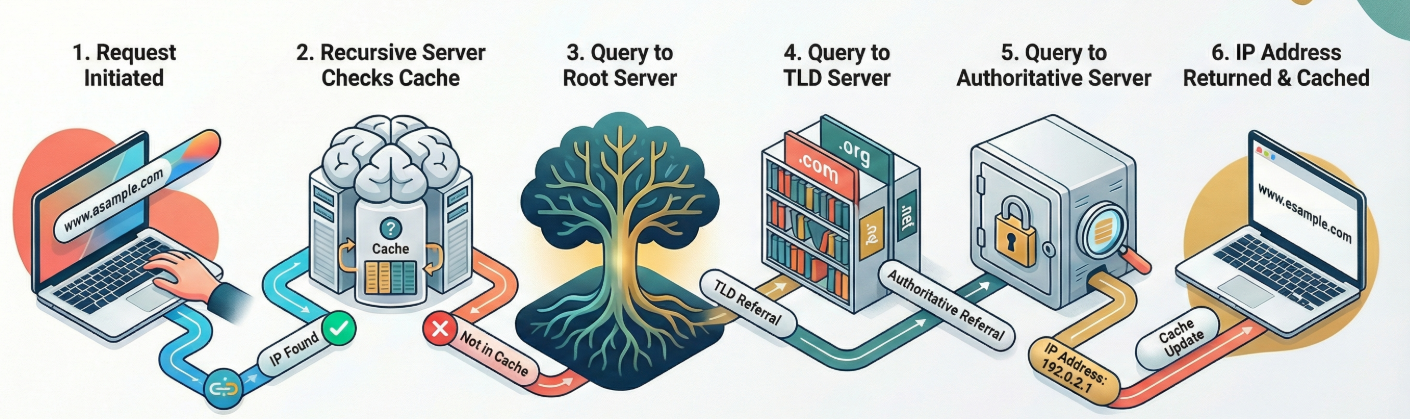
That cache is why most lookups are fast: the full walk only happens the first time someone using that resolver asks for a name.
So when google.com loads instantly, it's not because one server knew the answer. It's because the root knew who handles .com, .com knew who handles google.com, and google.com's own servers finally knew the address.
Next: DNS Record Types Explained. More posts on networking.